How to Make a Giant Cat AI Video from One Photo
Last updated:
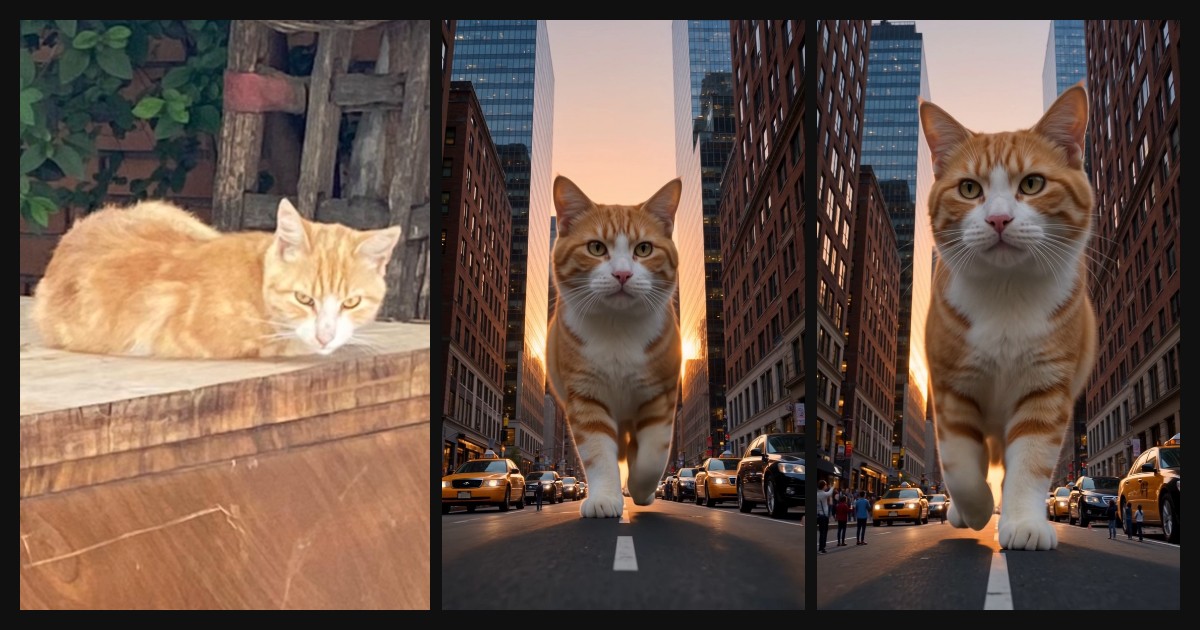
Start with a clear photo of one cat. This guide shows how to choose the photo, make a New York street video and save the MP4.
1. Pick the right photo
Choose a sharp photo of one cat with its full body, or at least its head and chest, in frame. Even light works best. Avoid blurry shots, several pets in one photo, heavy filters and photos that show people.
How to keep your cat’s face and markings
Pick a photo where you can see both eyes, the muzzle and the edges of any distinctive patches. If an object covers the face, choose a different photo rather than cropping in tighter.
The comparison above shows the photo we used and two frames from the same Kling 4.0 render. The orange tabby stripes carry through, but the white pattern around the face changes. Compare those details before you share your own clip. If the face drifts, try a clearer photo with less glare and fewer shadows.
2. Upload and preview your photo
Sign in and drop your cat photo into the generator. Check the preview before you start. The video uses the New York street scene.
| Video | Credits |
|---|---|
| 10 seconds, 720p, 9:16 MP4 | 10 |
3. Confirm and generate
Tick the box to confirm the photo shows your own pet or that you have the right to use it, then start the render. You can leave the page while it works.
4. Download and check the framing
Download the MP4 from the result or My videos. Play the whole clip before sharing. In the New York scene, check that the cat’s face stays visible in the vertical frame and that cars or building floors make the scale easy to read.
Preset scene or general video tool?
Use a preset when you want a particular scene without writing a prompt. Use a general image-to-video tool if you need to choose the location, action or camera movement yourself. This generator uses fixed scene prompts.
FAQ
How long does a Giant Cat AI Video take to make?
Render time depends on the queue. You can leave the page while it runs and check My videos later.
How many credits does a video cost?
Each 10-second video costs 10 credits. Credits are refunded automatically if a render fails.
Which photo gives the best result?
A sharp photo of one cat with its full body, or its head and chest, in frame and in even light. Avoid blur, several pets, heavy filters and people in the shot.
Your Giant Cat AI Video moment is one photo away
Create my video